
Seedance 2.0 Text to Video: A Practical Beginner Workflow
Learn a practical, repeatable Seedance text to video workflow to produce usable clips faster, with clearer prompts, camera control, and fewer failed generations.
Most people who try Seedance for the first time do not fail because the model is weak. They fail because the workflow is vague.
They write one broad sentence, click Generate, and expect a production-ready video. Then they get inconsistent output, spend extra credits on retries, and conclude text-to-video is random.
This guide gives you a practical Seedance text to video method based on:
- official Seedance prompt principles,
- repeatable prompt patterns seen in creator examples,
- and real product behavior in modern Seedance AI video generators (mode switch, duration, credits, queue, and history).
If you want to test while reading, start here: Seedance AI Video Generator
TL;DR
- A good Seedance text to video result starts with a single-shot prompt, not a broad story wish.
- Use the 5-element structure: subject, scene, action chain, camera language, and atmosphere/sound.
- For clips with several moments, use a timeline format aligned to duration settings (5s:
0-2s, 2-4s, 4-5s; 10s:0-3s, 3-6s, 6-10s). - Make one change at a time to avoid wasting credits.
- Treat Seedance text to video as a repeatable way of working, not one-off experimentation.
Why Most Beginners Struggle With Seedance Text to Video
The most common failure pattern is not technical. It is structural:
- Prompt is abstract.
- Actions are not sequenced.
- Camera behavior is undefined.
- Revision strategy is random.
That is why this Seedance text to video workflow is focused on control first.
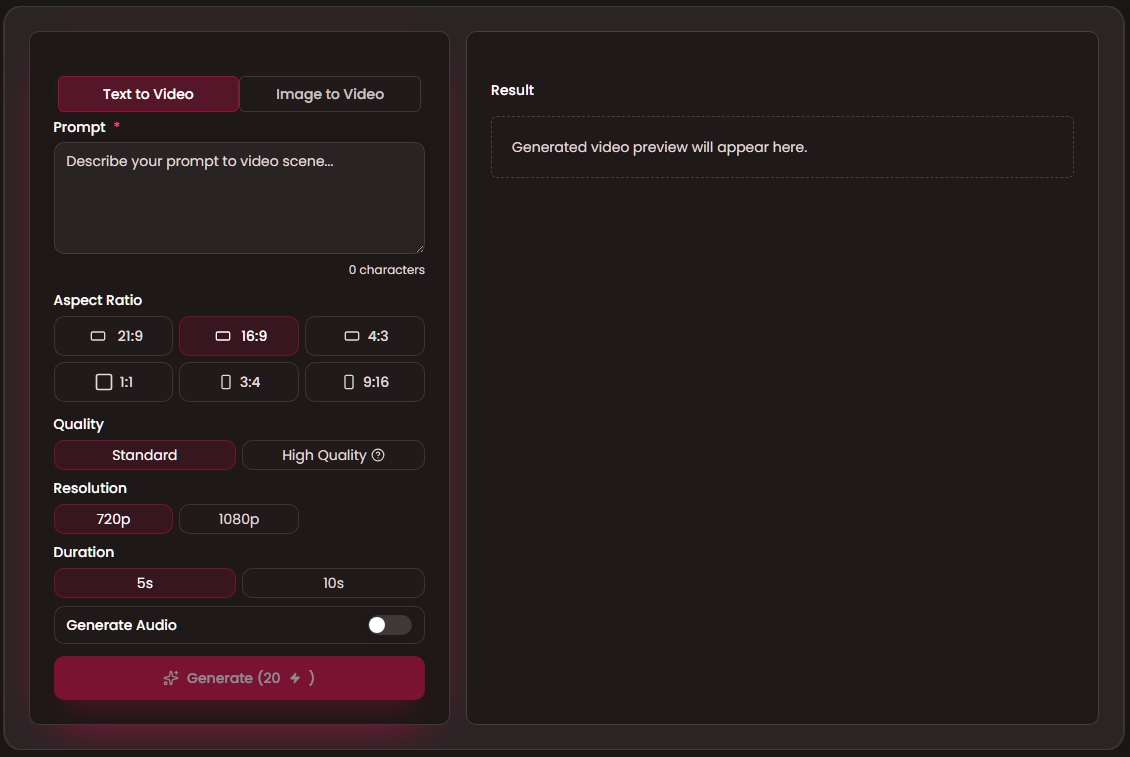
The practical baseline in this site's current generator:
Mode: Text to Video.Aspect Ratio:21:9,16:9,4:3,1:1,3:4,9:16.Duration:5sor10s.Generate: after you clickGenerate, you can see whether your video is still processing, completed, or failed.Credits: the system checks your available credits before generation, records usage after generation, and returns credits for failed runs based on platform policy.
The 5-Element Formula for Seedance Text to Video
From official examples and repeatable creator practice, the most reusable framework is the five-element method. It works especially well for Seedance text to video because it turns vague ideas into clear instructions.
Use this structure:
[Subject] + [Scene] + [Action Chain] + [Camera Language] + [Atmosphere/Sound]
Example: weak prompt vs usable prompt
| Type | Prompt | Typical result |
|---|---|---|
| Weak | "A woman walking in London, cinematic style." | Generic motion, inconsistent focus |
| Usable | "A woman in a red trench coat walks through a rainy 19th-century London street. Camera starts with front tracking, then slight pull-back to reveal street scale. A steam vehicle rushes from her right side, wind lifting her coat hem. Street footsteps and crowd ambience." | Higher continuity, clearer camera intention |
Why this works for Seedance text to video:
- Subject is explicit.
- Scene is bounded.
- Action is sequential.
- Camera instructions are specific.
- Mood/sound is concrete.
Step-by-Step Beginner Workflow
This is the practical Seedance text to video flow you can repeat every day.
- Define one shot objective only.
Avoid writing full story arcs in first attempt. One scene, one objective. - Write the first prompt with the 5-element structure.
Keep it specific, not poetic. - Lock ratio and duration for the first three attempts.
Do not change everything at once. - Generate and inspect only three dimensions.
Action accuracy, camera continuity, end-frame clarity. - Iterate one variable at a time.
Action first, camera second, atmosphere third. - Save versioned prompts (
v1,v2,v3).
Your history becomes a reusable production library.
This process makes Seedance text to video more predictable for real publishing.
Timeline Prompts: A Practical Way to Improve Control
When a clip has several moments, use a timeline format instead of one long paragraph.
Recommended format:
For 5s:
0-2s: opening action and scene lock
2-4s: camera redirection or reaction
4-5s: final beat and ending frame

For 10s:
0-3s: opening action and scene lock
3-6s: camera redirection or reaction
6-10s: main event and ending frame
Example:
0-3s: Alarm rings in dim bedroom, frame gradually clears from blur.
3-6s: Quick pan to close-up of man asking woman to wake up.
6-10s: Woman hides under blanket and refuses; medium shot of man sighing, then smiling, speaking one short line.
Timeline writing usually improves control in short Seedance text to video outputs because each time block has a clear action target.
Camera Language That Actually Changes Results
In Seedance text to video, camera words are not style decoration. They tell the model exactly how to film the scene.
Use this 3-step method:
- Pick one camera goal first.
Choose only one: show detail, follow movement, reveal environment, or create a strong character feeling. - Choose 1-2 camera actions for that goal.
Do not stack many camera moves in one short clip. - Write one clear camera line in the prompt.
Format:Camera: [start frame], then [move], ending on [final frame].
Quick mapping table:
| If you want... | Use this camera instruction | What to type in prompt |
|---|---|---|
| Product detail | push in | Camera starts in medium shot, then pushes in to close-up of the product logo. |
| Character continuity | tracking shot | Camera tracks behind the character as they walk through the corridor. |
| Space reveal | pull back | Camera starts close on the face, then pulls back to reveal the full room. |
| Redirect attention | pan | Camera pans right from the stove to the person speaking. |
| Hero feeling | low angle | Low-angle shot as the character steps forward and looks into frame. |
| Immersive sequence | one-shot | One-shot, no cuts, camera follows the subject from door to window. |
Copy-ready examples:
For 5s:
Camera: medium shot of the runner, tracking shot forward, ending on a close-up of the runner's face.

For 10s:
Camera: close-up on product surface, push in to logo detail, then pull back to reveal full product on table.
If you skip camera instructions, the model fills gaps on its own. If you define camera behavior clearly, results are much easier to control.

Photo by Evgeni Tcherkasski on Unsplash.
Prompt Templates You Can Copy
1) Daily scene template
[Subject] in [location] performs [micro-action 1], then [micro-action 2], then [micro-action 3].
Camera: [camera move 1], then [camera move 2].
Atmosphere: [lighting style], [sound cues].
2) Product ad template
Commercial showcase of [product]. Start with material close-up, then side reveal, then practical usage.
Camera: smooth push-in, controlled rotation, clean final hero frame.
Audio: premium modern rhythm.
3) Reversal template
0-3s: serious setup and high-stakes line.
3-6s: tension build with close-up and slow push.
6-8s: sudden reversal.
8-10s: wide shot + brand line.
These templates keep Seedance text to video output practical instead of random.
Common Failure Patterns and Fixes
Failure 1: "Looks cool but wrong"
Cause: abstract wording ("cinematic", "emotional", "epic") without physical action detail.
Fix: replace mood-only wording with observable action chain.
Failure 2: "Motion breaks between moments"
Cause: no timeline and no transition verbs.
Fix: add explicit time blocks and continuity language (then, immediately, without cut).
Failure 3: "Too expensive to iterate"
Cause: full prompt rewrite every run.
Fix: change one thing at a time and keep prompt versions.
Failure 4: "Result quality changes too much"
Cause: you are changing ratio, duration, and prompt together.
Fix: lock ratio and duration early; revise prompt first.
What to Measure Before You Generate Again
A simple scoring checklist for Seedance text to video:
| Checkpoint | Question | Pass criterion |
|---|---|---|
| Subject clarity | Can a viewer identify the subject in first 2 seconds? | Yes/No |
| Action continuity | Do actions connect logically without sudden jumps? | Yes/No |
| Camera intent | Is camera movement purposeful, not random? | Yes/No |
| Ending quality | Is the final frame usable to publish now or edit further? | Yes/No |
| Prompt reuse | Can this prompt be reused with minor edits? | Yes/No |
If 4 out of 5 pass, keep iterating from this version. If not, revise structure before spending more credits.
Recommended Next Steps (High-Value Links Only)
Use only the pages that help your next action right now:
- Start generating now: apply this workflow immediately.
- Compare plan options: choose cost model before high-volume testing.
- Read Seedance 2.0 overview: understand model strengths and limits.
- Check content policy: avoid prompts that may be blocked.
FAQ
Is Seedance text to video enough for commercial work?
It is enough for many short-form ad concepts, social clips, and pre-visualization. For strict brand consistency, you may later combine image/video references.
Should beginners start with 5s or 10s?
Start with 5s for faster iteration and clearer diagnostics. Move to 10s after prompt structure is stable.
How many prompt changes should I make per retry?
One major change per retry. This keeps results easy to understand and avoids wasting credits.
What is the biggest quality lever in Seedance text to video?
Action chain quality plus camera language clarity. These two improve output more than style adjectives.
When should I stop iterating a clip?
When your clip passes 4 out of 5 checks and the ending frame is usable for publishing or further edits.
Final Takeaway
The best way to win with Seedance text to video is not writing longer prompts. It is writing prompts with clear control intent.
Use the five elements.
Use timeline blocks for clips with several moments.
Change one thing at a time.
Use your saved prompts as a reusable library.
If you do this consistently, Seedance text to video becomes a reliable creative tool instead of a gamble.
If you want a simple implementation target for this week, use this plan:
- Create three prompts in one niche (for example: product ad, short story, and dialogue scene).
- Run each prompt at 5 seconds first, then expand the best one to 10 seconds.
- Keep a short log for each run: what changed, what improved, what failed.
- Save the top two prompts as reusable templates for next week.
This turns learning into a measurable process and helps you build a reusable prompt library for future videos.
Next step: Generate your first clip · Choose a plan
Disclaimer: This site is an independent product and is not an official Seedance service. Generated outputs may vary based on prompt quality, model behavior, and policy constraints.
Categories
More Posts

One-Shot AI Video Prompt: Make Smooth Videos Without Jump Cuts in Seedance 2.0
Use this one-shot AI video prompt guide to create continuous camera motion in Seedance 2.0, with practical 5s and 10s templates, fixes, and reusable workflows.

Seedance Prompt Guide: The 5-Element Method for Seedance 2.0
Use this Seedance prompt guide to write better prompts with a clear 5-element method: subject, scene, action, camera, and atmosphere.

Seedance Pricing Strategy: Pay-as-You-Go vs Subscription by Use Case
This Seedance pricing guide explains when Pay-as-You-Go or Subscription is better, with practical usage scenarios, cost logic, and decision rules for creators and teams.