
Seedance Prompt Guide: The 5-Element Method for Seedance 2.0
Use this Seedance prompt guide to write better prompts with a clear 5-element method: subject, scene, action, camera, and atmosphere.
If you use Seedance regularly, you already know this pattern: one prompt gives a clean result, and the next prompt with a similar idea gives something far off.
Most of the time, that is not random model behavior. It is a prompt structure problem.
This Seedance prompt guide gives you a practical structure you can reuse every day: the 5-element method.
If you want to test while reading: Seedance AI Video Generator
TL;DR
- A strong Seedance prompt guide should start with structure, not adjectives.
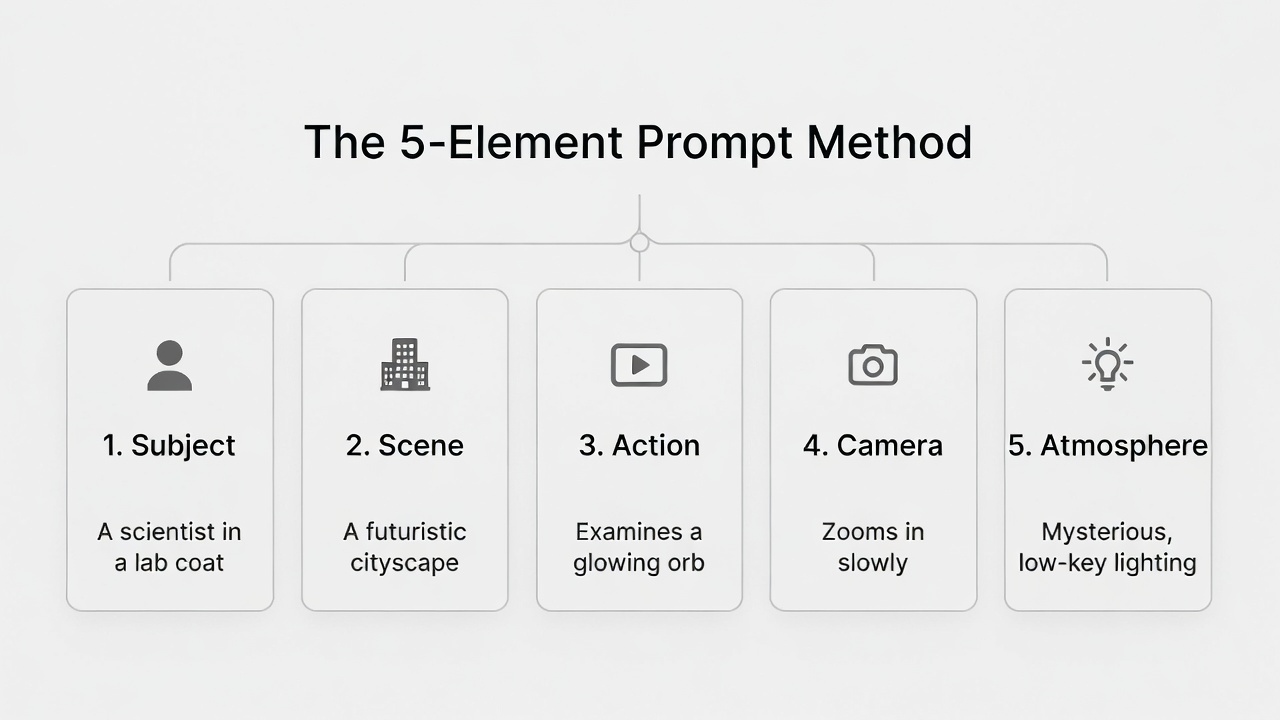
- The 5 elements are: subject, scene, action, camera, and atmosphere.
- You do not need long prompts; you need clear prompts.
- For 5s and 10s clips, map your elements to short time blocks.
- Use one-change retries to improve quality without wasting credits.
Why a Seedance Prompt Guide Needs Structure
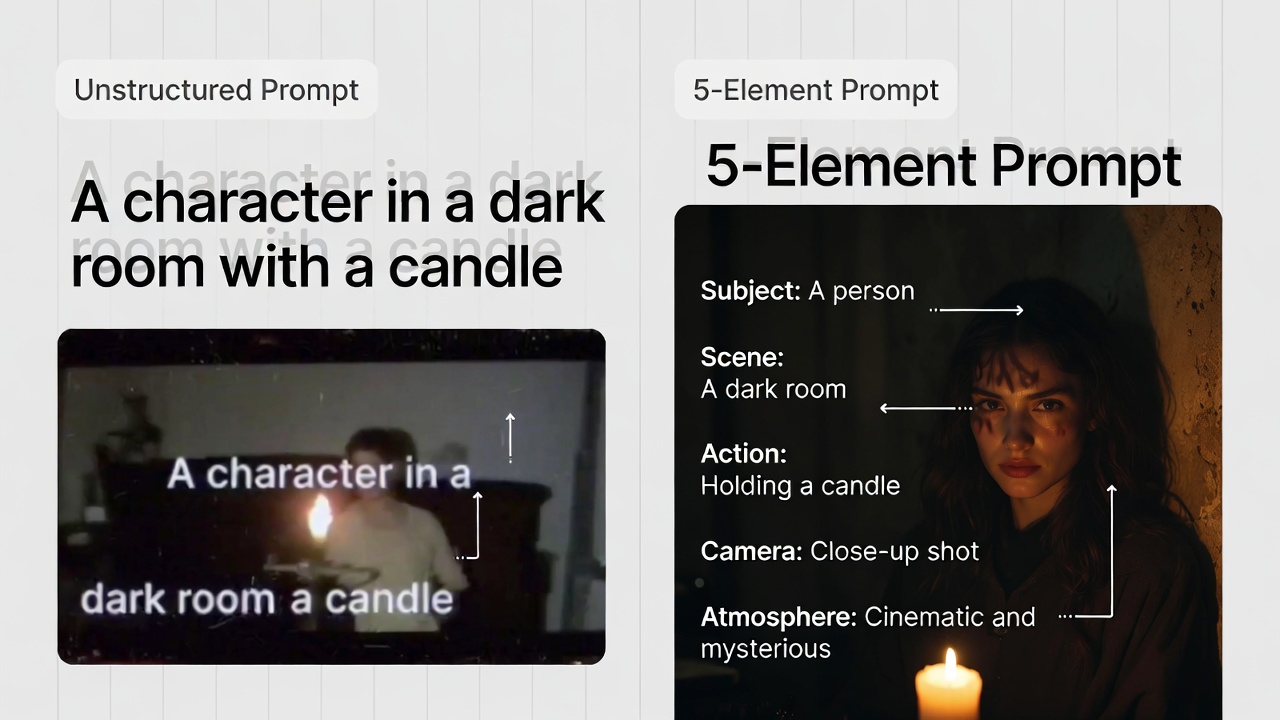
Many prompts fail because they are written as wishes:
Cinematic and emotional scene, very cool and high quality.
The model can produce something visual, but it still has to guess:
- Who is the focus?
- Where exactly is the action?
- What happens first, second, and last?
- How should the camera move?
- What feeling should the clip leave at the end?
A useful Seedance prompt guide removes guessing by answering those questions directly.
The 5-Element Method (Core Framework)
Use this order:
[Subject] + [Scene] + [Action] + [Camera] + [Atmosphere]
What each element means:
| Element | What to define | Good example |
|---|---|---|
| Subject | Who or what is the main focus | A woman in a red coat |
| Scene | Where it happens | Rainy old street at night |
| Action | What happens in sequence | Walks, stops, turns to camera |
| Camera | How to film it | Tracking shot, then push in |
| Atmosphere | Tone, sound, and visual mood | Cold lighting, wet reflections, city ambience |
This Seedance prompt guide works because every element adds control without forcing long text.
Step-by-Step: Build a Prompt in 4 Minutes
Use this quick process:
- Write one line for subject and scene.
- Write action as a short sequence (2-4 moves).
- Add one camera line (start, move, end).
- Add one atmosphere line (light, sound, tone).
Example:
Subject: A woman in a red coat.
Scene: Rainy old street at night.
Action: She walks forward, slows down, then turns to camera.
Camera: Tracking shot from front, then gentle push in to close-up.
Atmosphere: Cold blue highlights, wet street reflections, distant traffic ambience.
Combined prompt:
A woman in a red coat walks on a rainy old street at night. She walks forward, slows down, then turns to camera. Camera tracks from the front, then gently pushes in to a close-up. Cold blue highlights, wet reflections, distant traffic ambience.That is the entire Seedance prompt guide in action: clear pieces, then one combined line.
5s and 10s Prompt Mapping
Because your generator uses 5s and 10s durations, map the five elements to those lengths.
For 5s clips
0-2s: Subject + Scene
2-4s: Action + Camera move
4-5s: Ending frame + Atmosphere hold
For 10s clips
0-3s: Subject + Scene setup
3-6s: Main action + Camera move
6-10s: Final action + Ending frame + Atmosphere
This timing rule makes the Seedance prompt guide practical for your real product settings.
Copy-Ready Prompt Templates
Template A: Character Intro
[Subject] in [Scene]. [Action sequence].
Camera: [start framing], [main camera move], [ending frame].
Atmosphere: [light], [sound], [tone].
Template B: Product Motion
[Product] on [surface/background]. [Action sequence].
Camera: close-up start, push in to detail, pull back to full product.
Atmosphere: clean studio lighting, minimal ambient sound.
Template C: Short Story Beat (10s)
0-3s: [Subject + Scene setup]
3-6s: [Main action + camera transition]
6-10s: [Resolution + ending frame]
Atmosphere: [sound + mood]
If you are building a Seedance prompt guide for your own workflow, these three templates are enough to start.
Common Mistakes and Better Rewrites
Mistake 1: Too many style words, not enough actions
Weak:
Epic cinematic emotional scene, high quality, beautiful mood.
Better:
A man stands in an empty station at night, looks left, then starts walking toward camera. Camera begins wide, then tracks forward and ends on medium close-up. Cool light, low train ambience.
Mistake 2: Camera words with no motion logic
Weak:
Pan, push, pull, tracking, one-shot all together.
Better:
Camera starts in medium shot, tracks with subject for 3 seconds, then pushes in for final close-up.
Mistake 3: No ending frame
Weak:
Subject keeps moving fast.
Better:
End on stable close-up with subject facing camera.
Every good Seedance prompt guide should teach rewrite habits, not just definitions.
A Simple Review Checklist Before Generate
Check these six items:
- Is the subject clear in one sentence?
- Is the scene specific enough to imagine?
- Are actions written as a sequence, not a keyword list?
- Does the camera line include start, move, and end?
- Is the atmosphere line simple and concrete?
- Does the ending frame feel usable?
If 5 out of 6 are yes, run generation.
If not, fix the missing part first instead of rewriting everything.
How to Improve Faster Without Burning Credits
This is the fastest learning loop:
- Save your base prompt as
v1. - Change one element only for
v2(for example camera only). - Keep other elements unchanged.
- Compare results and keep the winner.
Example:
v1: same subject, scene, action; camera istracking.v2: same subject, scene, action; camera ispush in.
You learn exactly what changed. That is the practical advantage of this Seedance prompt guide approach.
15-Minute Practice Drill
If you want to make this method stick, run this short exercise:
- Pick one still subject and one location.
- Write one 5-second version using all five elements.
- Write one 10-second version of the same idea.
- Generate both and compare only three things:
- action clarity,
- camera clarity,
- ending frame quality.
- Rewrite only the weakest element and run once more.
Practice example:
Base idea:
Street musician at night.

5s version:
Subject: street musician with guitar.
Scene: wet city corner at night.
Action: strums once, looks up, smiles.
Camera: medium shot, slow push in, end on face.
Atmosphere: light rain, soft city ambience.

10s version:
Subject: street musician with guitar.
Scene: wet city corner at night.
Action: adjusts guitar strap, starts strumming, looks up, smiles.
Camera: wide start, tracking step forward, gentle push in to close-up.
Atmosphere: light rain, reflections on ground, soft city ambience.
This drill helps you see how timing changes prompt design without changing the main creative idea.
When to Add More Detail (And When Not To)
Add more detail when:
- the subject keeps drifting,
- camera movement feels wrong,
- ending frame is unusable.
Do not add more detail when:
- your action is already clear,
- your camera path is stable,
- your output issue is mostly style preference.
In those cases, small adjustments are better than full rewrites.
Keep a Reusable Prompt Library
After every good result, save the prompt with a short label:
character-intro-5s-v1product-reveal-10s-v2street-scene-tracking-v1
Over time, this becomes your own playbook. Instead of starting from zero, you start from proven structures and adapt faster. It also helps teams share a common prompt language and review quality faster.
FAQ
Do I need all five elements every time?
Not always. But for beginners, using all five usually gives more stable results.
Which element improves output the most?
Action and camera together usually have the biggest visible impact in short clips.
Is this method only for cinematic videos?
No. The same structure works for product clips, social content, character intros, and short ad visuals.
Should I start with 5s or 10s?
Start with 5s to test structure quickly. Move to 10s when your base prompt is stable.
Why do similar prompts still give different results sometimes?
Because small wording differences can change action order or camera interpretation. Structured writing reduces this variance.
Recommended Next Steps (High-Value Links Only)
- Start generating now: test the 5-element method right away.
- Compare plan options: choose the right plan before batch testing prompts.
- Read Seedance 2.0 overview: see where this method fits in broader workflows.
- Check content policy: avoid blocked outputs and unnecessary retries.
Final Takeaway
A good Seedance prompt guide is not about writing longer prompts. It is about writing clearer prompts.
Use five elements. Keep timing aligned to 5s or 10s. Change one part per retry. Keep what works and reuse it.
That is how prompts become a repeatable system instead of guesswork.
Next step: Generate your first 5-element prompt video · Choose a plan
Disclaimer: This site is an independent product and is not an official Seedance service. Generated outputs may vary based on prompt quality, model behavior, and policy constraints.
Categories
More Posts

Seedance Workflow: History, Credits, and Repeatable Production
Build a reliable Seedance workflow with practical steps for generation history, credit control, and repeatable production routines for creators and small teams.

Seedance Timeline Prompt: Control 5s and 10s Clips Precisely
Learn a practical Seedance timeline prompt method for 5-second and 10-second clips with clear timing blocks, copy-ready templates, and fast debugging steps.

Seedance 2.0 Image to Video: Turn One Image into a Usable Clip
Learn a practical Seedance image to video workflow to turn one still image into a usable 5s or 10s clip with clear motion and stable style.